
Technical SEO Explained, How It Works, What to Fix First, and Why It Matters

Technical SEO is the work of making your website eligible to be crawled, rendered, and indexed reliably so search engines can actually use your content to rank you. When that pipeline breaks, great content can stay invisible, rankings can stall, and traffic can drop for reasons that are not “content quality” at all.
- Technical SEO is mostly about eligibility: can Google access, process (render), and store (index) your pages consistently.
- You can diagnose most high-impact issues with a repeatable workflow using Google Search Console plus one crawler.
- Fix order matters: prioritize access and indexability blockers before performance or “nice-to-have” enhancements.
What Technical SEO Is and Why It Matters
Technical SEO matters because it removes the technical friction that prevents search engines from discovering and trusting your pages at scale. A practical definition we use in audits is: technical SEO is everything that affects crawlability, renderability, and indexability, plus the site-level signals (like canonicalization and structured data) that help engines interpret your pages correctly.
What technical SEO is not (common misconceptions)
- Not “adding keywords to meta tags” (that is on-page).
- Not “building backlinks” (that is off-page).
- Not “speed fixes only” (performance is one slice, but access and indexability come first).
Business benefits you can tie to outcomes
- More pages eligible to rank: fewer excluded URLs and fewer wasted crawls.
- Faster content uptake: new or updated pages get indexed sooner when discovery and canonical signals are clean.
- Less ranking volatility: fewer accidental duplicates, redirect chains, or rendering gaps that cause “why did this page drop?” moments.
The 4 Types of SEO and Where Technical SEO Fits
Technical SEO is the foundation layer that makes on-page, content, and off-page SEO work consistently, because it governs whether pages can be accessed and interpreted in the first place. If you want a simple mental model, split SEO into four buckets and assign an owner to each, so fixes do not bounce between teams.
A simple classification with examples
- Technical: robots rules, sitemaps, canonicals, status codes, internal linking crawl paths, JS rendering, structured data, Core Web Vitals diagnostics.
- On-page: title tags, headings, content formatting, internal anchor text, image alt text.
- Content strategy: topic coverage, information architecture, content refreshes, intent matching.
- Off-page: links, mentions, citations, PR, partner pages.
Ownership table (who typically fixes what)
| SEO type | Typical owner | Primary tools | Common deliverable |
|---|---|---|---|
| Technical | Developer + SEO | GSC, crawler, server logs | Fix list with validation checks |
| On-page | SEO + Content | CMS, SERP checks | Template rules and page updates |
| Content | Content lead | Briefs, analytics | Topic map and publishing plan |
| Off-page | PR/Marketing | Outreach tools | Mentions and links |
If you want a deeper, fix-first framework for site issues, this guide on website technical SEO pairs well with the checklist later in this article.
How Google Finds and Stores Your Pages, Crawl to Render to Index
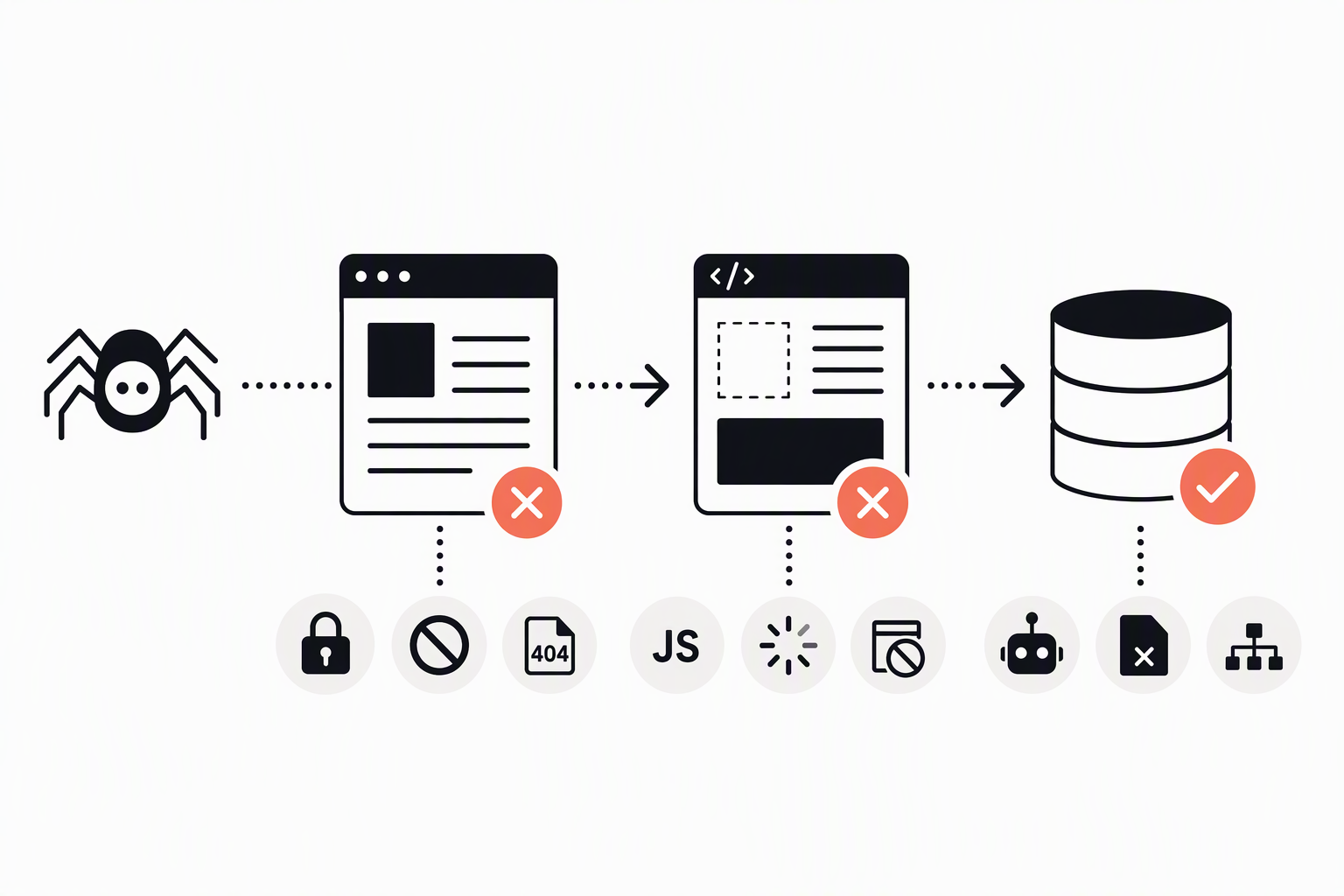
Google visibility is gated by a pipeline: Googlebot has to crawl a URL, Google has to render the page if needed, and then Google has to index the content so it is eligible to rank. Thinking in these three steps helps beginners stop guessing and start pinpointing failure modes with specific checks.
Step 1: Crawl (discovery and access)
- What breaks: robots.txt blocks, 401/403 responses, broken internal links, orphan pages, infinite URL patterns (facets, parameters).
- What to check in GSC: URL Inspection shows “Crawl allowed?” and the last crawl outcome.
- Quick verification: fetch the URL in your browser and with a crawler user-agent; confirm the server returns a 200 for the canonical URL.
Step 2: Render (processing the page)
- What breaks: content loaded only after user interaction, blocked JS/CSS resources, heavy client-side rendering that times out, soft 404 templates.
- What to check in GSC: URL Inspection → “View crawled page” and the rendered HTML screenshot (when available) to confirm main content is present.
- Rule of thumb: if critical content only exists after JS, Google may still index it, but it is easier to lose consistency, especially across templates.
Step 3: Index (storage and canonical selection)
- What breaks: noindex tags, canonical pointing elsewhere, duplicates, thin pages, redirecting canonical, inconsistent hreflang.
- What to check in GSC: Indexing → Pages report for “Excluded” reasons; URL Inspection → “Google-selected canonical” vs “User-declared canonical.”
After running many technical SEO audits, the pattern was clear: most “we are not ranking” problems trace back to indexability decisions (canonicals, noindex, duplicates) rather than keyword usage on the page.
Technical SEO Examples You Can Spot and Fix This Week
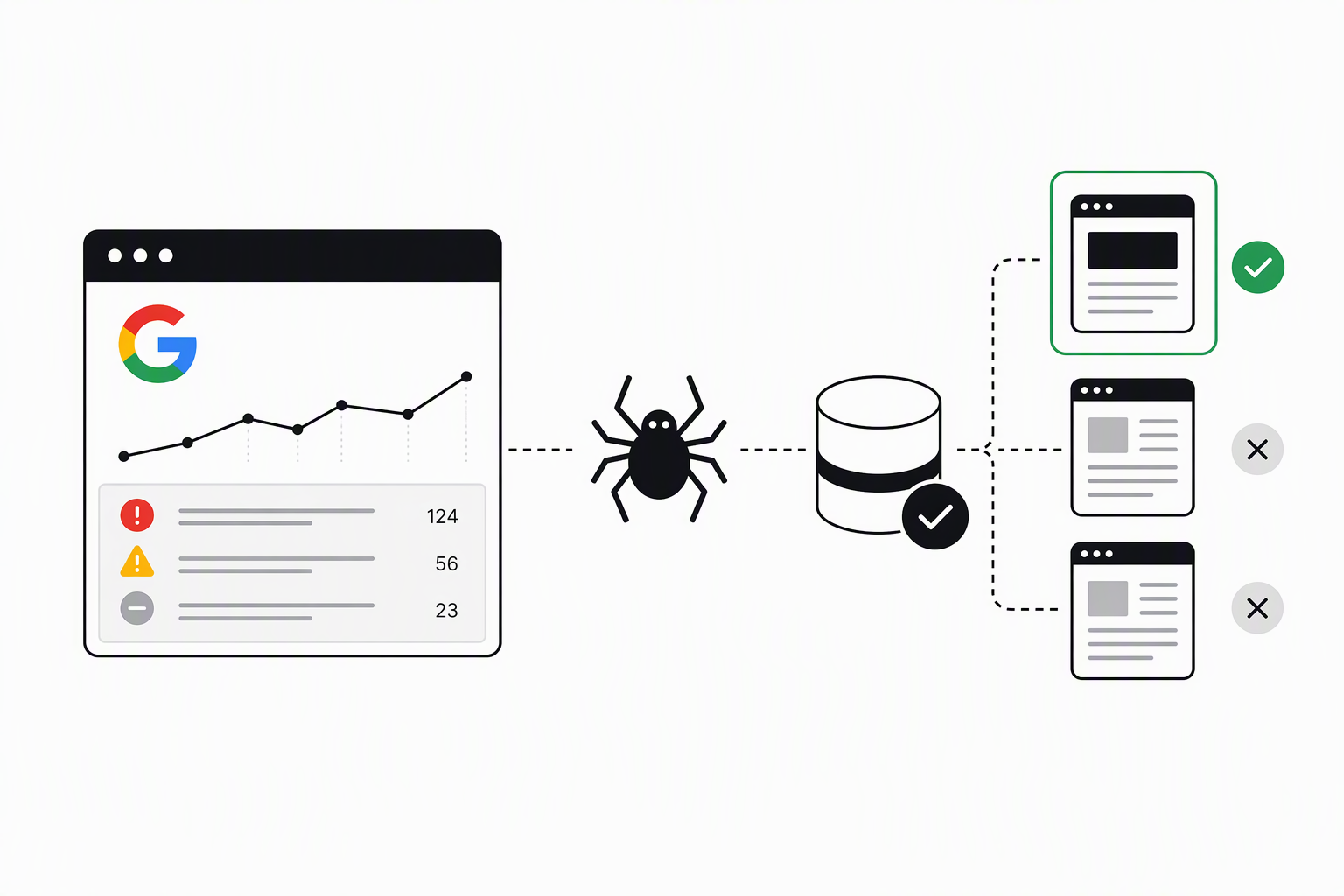
Technical SEO fixes move faster when each issue has three parts: how to detect it, how to fix it, and how to validate the change. The mini-diagnostics below are designed to be run in under a week using Google Search Console plus a crawler like Screaming Frog SEO Spider (tool link).
1) Robots.txt blocking important paths
- Detect: GSC URL Inspection says “Crawl allowed? No: blocked by robots.txt”.
- Fix: remove or narrow the Disallow rule; avoid blocking CSS/JS needed for rendering.
- Validate: re-test in URL Inspection and confirm the next crawl is allowed.
2) Accidental noindex on live templates
- Detect: crawl your site and filter pages with meta robots = noindex; in GSC, pages show “Excluded by ‘noindex’ tag”.
- Fix: remove noindex from production templates; keep it only for staging or low-value utility pages.
- Validate: URL Inspection should show “Indexing allowed? Yes” and the Pages report should shrink over time.
3) Canonicals pointing to the wrong URL (or to redirected URLs)
- Detect: GSC URL Inspection shows Google-selected canonical different from your declared one; crawler shows canonical URL returns 3xx.
- Fix: set canonicals to the final 200-status preferred URL; standardize trailing slash, lowercase, and parameters.
- Validate: confirm canonical target returns 200 and GSC begins aligning selected and declared canonicals.
4) Redirect chains wasting crawl budget and slowing discovery
- Detect: crawler “Redirect Chains” report; look for 2+ hops.
- Fix: update internal links to point to the final destination; compress chains at the server level.
- Validate: re-crawl and ensure one hop max (ideal: direct 200 on internal links).
5) Soft 404 pages (200 status, but effectively not found)
- Detect: GSC Pages report includes “Soft 404”; templates show “not found” messages but return 200.
- Fix: return real 404/410 for removed content; for near-replacements, 301 redirect to the closest match.
- Validate: URL Inspection should no longer flag Soft 404 after recrawl.
6) Internal links that trap crawlers (JS-only navigation)
- Detect: crawler shows low crawl depth coverage; important pages are only reachable via JS events; GSC shows “Discovered, currently not indexed” for many URLs.
- Fix: ensure primary nav and pagination are plain HTML links (
<a href="...">) in the initial HTML. - Validate: re-crawl and confirm the pages are discovered without executing scripts.
7) Duplicate pages from URL parameters
- Detect: crawler shows multiple URLs with identical titles/H1; GSC shows “Duplicate, Google chose different canonical”.
- Fix: enforce canonical rules, parameter handling, and consistent internal linking to the preferred version.
- Validate: monitor canonical alignment in URL Inspection and a drop in duplicate exclusions.
8) Missing or misleading structured data on key templates
- Detect: GSC Enhancements reports errors; test templates in Google’s Rich Results Test (tool link).
- Fix: add valid schema for the page type (Organization, Article, Product where applicable) and keep it consistent with visible content.
- Validate: re-test and monitor Enhancement status improvements.
What surprised our team was how often “small” canonical and redirect issues create large indexing swings on medium-sized sites, especially after migrations or CMS template changes.
For content-side relevance after the technical layer is stable, it helps to understand how semantic SEO and entity SEO complement technical SEO without turning everything into engineering work.
A Prioritized Technical SEO Checklist You Can Reuse
A reusable technical SEO checklist is most useful when it forces prioritization by severity and verification method instead of producing a 200-item backlog. The table below is the starter version we use to triage fixes quickly, then expand only where the site’s architecture demands it.
Audit-ready checklist with severity, effort, tools, owner, cadence
| Area | Check | Severity | Effort | How to verify | Owner | Cadence |
|---|---|---|---|---|---|---|
| Access | Robots.txt not blocking money pages | High | Low | GSC URL Inspection + robots tester | SEO/Dev | Monthly |
| Indexing | No accidental noindex on production templates | High | Low | Crawl meta robots + GSC Pages exclusions | SEO/Dev | Monthly |
| Canonical | Canonical targets are 200 and correct | High | Medium | Crawl canonicals + spot-check in GSC | SEO/Dev | Monthly |
| Redirects | No redirect chains in internal links | Medium | Medium | Crawler redirect chain report | Dev | Quarterly |
| Rendering | Main content present in rendered HTML | High | Medium | GSC “View crawled page” + crawler JS render sample | Dev | Quarterly |
| Architecture | Important pages reachable via HTML links | High | Medium | Crawl depth + internal link counts | SEO/Dev | Quarterly |
| Duplicates | Parameter pages controlled (canonical or noindex) | Medium | Medium | GSC duplicate reasons + crawl URL patterns | SEO | Quarterly |
| Sitemaps | XML sitemap lists only canonical 200 URLs | Medium | Low | GSC Sitemaps report + sample crawl | SEO | Monthly |
| Performance | Core Web Vitals issues triaged by template | Low-Med | High | GSC CWV report + PageSpeed Insights | Dev | Quarterly |
| Structured data | Enhancements errors resolved on key templates | Low-Med | Medium | GSC Enhancements + Rich Results Test | SEO/Dev | Quarterly |
Is SEO Dead With AI, What Changes for Technical SEO
SEO is not dead with AI, but technical SEO becomes more important because AI systems still depend on accessible, consistent source pages to retrieve and cite. Whether the “engine” is Google Search, Google AI Overviews, or an LLM-based assistant, the basics still start with: can the system fetch your page, interpret it without ambiguity, and trust the page is the canonical source.
What to do differently for AI-driven discovery
- Access still comes first: if crawlers cannot reach key pages due to auth walls, robots rules, or unstable responses, you cannot be surfaced reliably.
- Rendering realism: if your critical definitions, pricing, or product descriptions only appear after heavy client-side rendering, you increase the chance of partial extraction or missed context.
- Citation-readiness hygiene: keep author pages, organization info, and “source of truth” pages consistent so engines can attribute statements confidently.
Practical checks you can run in under an hour
- Pick 10 important URLs and confirm: 200 status, self-referencing canonical (or a clear canonical choice), and index allowed.
- Use GSC URL Inspection on a few JS-heavy pages and confirm the rendered view contains the primary content, not placeholders.
- Make sure your internal links point to the canonical version so discovery signals are consistent.
If you are exploring automation for content QA and reducing errors during updates, this guide on AI for SEO can help you apply AI without breaking technical fundamentals.
FAQ
If you want a second set of eyes on your Google Search Console exclusions and a fix-first plan, Freeways can run a low-friction audit and turn the findings into a prioritized technical SEO checklist your team can execute.

Written by Joyce Ng.

Search Visibility Explained, How It Works and How to Measure It in Google Search Console
Learn what search visibility means, how tools calculate it, and how to measure search visibility in Google Search Console with a simple spreadsheet.

Semantic SEO Explained for 2026, The Practical Blueprint to Rank Beyond One Keyword
Learn semantic seo in 2026 with a practical blueprint: intent, entities, deliverables, examples, and a QA checklist to publish with confidence.

Website Technical SEO, A Practical Framework Plus Real Fix Examples
Learn website technical seo with an Impact–Effort–Risk framework, a starter audit workflow, and 5 real fix examples with validation steps.