
Website Technical SEO, A Practical Framework Plus Real Fix Examples

Website technical seo is the set of website and server changes that help search engines reliably access, understand, and index your pages, so your content can actually compete in search results.
- Use an Impact × Effort × Risk score to prioritize technical fixes instead of chasing long checklists.
- Run a repeatable audit loop with Google Search Console plus one crawler: diagnose, fix, validate, and monitor.
- Start with indexing and crawlability, then performance and templates, then enhancements like structured data.

Website Technical SEO Explained in Plain English
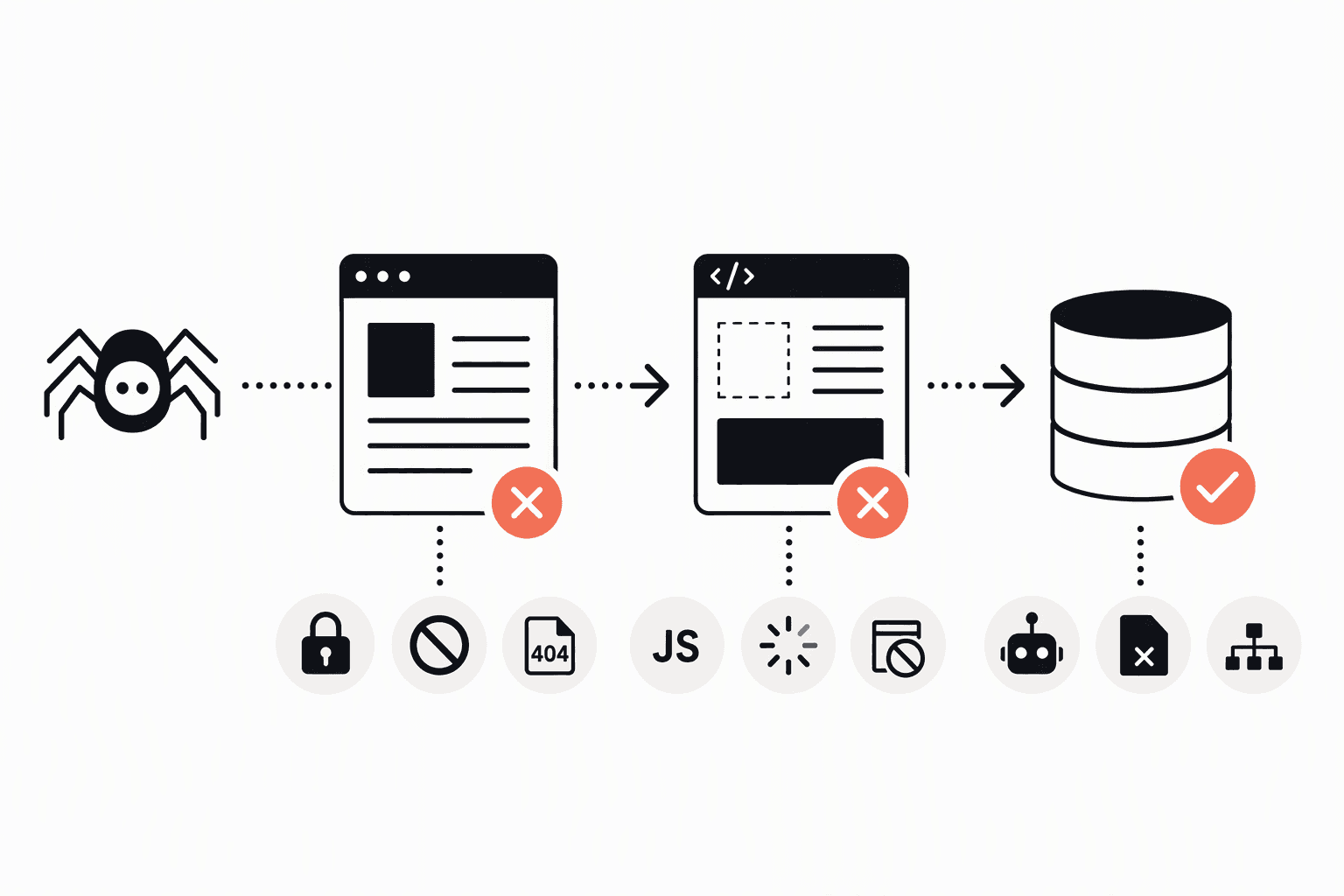
Website technical SEO focuses on whether a search engine can fetch your pages, render them, understand what each page is about, and store the right version in its index.
What technical SEO includes (and what it does not)
- Access and crawlability: robots.txt rules, noindex tags, canonical tags, redirects, internal linking, XML sitemaps.
- Indexing quality: duplicate URLs, parameter URLs, thin/near-duplicate pages, canonicalization mistakes.
- Performance and user experience signals: Core Web Vitals, mobile usability, page weight, server response time.
- Site architecture: logical URL structure, pagination handling, faceted navigation controls, breadcrumbs.
- Rendering and JavaScript: whether important content and links are visible to Google when rendered.
- Structured data: schema.org markup to help qualify for rich results (not a ranking guarantee).
Technical SEO is different from content SEO (what you say and how well you satisfy the query) and off-page SEO (links, mentions, citations). If you are still sorting the terminology, organic search vs. search engine optimization is a helpful conceptual baseline.
Why technical issues feel confusing in practice
Technical work often fails because teams treat it like a checklist instead of a system: a fix can improve crawlability but worsen indexing, or speed up pages while breaking rendering. The goal is not perfect “green checks”, it is removing the bottlenecks that prevent your best pages from being discovered and trusted.
A Simple Technical SEO Framework to Prioritize Fixes Without Guesswork
A prioritization framework beats a 200-item audit because it forces you to pick the few changes most likely to improve crawl, indexation, and performance with the least risk.
The Impact × Effort × Risk scoring model
Use a 1 to 5 score for each dimension, then compute a priority score:
- Impact (1 to 5): how much this could improve indexation, crawl efficiency, or user experience on important templates.
- Effort (1 to 5): how hard it is to implement and QA (time, engineering complexity, coordination).
- Risk (1 to 5): chance of causing traffic loss, deindexing, broken UX, or tracking issues.
Priority score = Impact ÷ (Effort × Risk). Higher is better. This formula intentionally penalizes risky changes unless the impact is very high.
Recommended fix order by category (the “don’t optimize the paint while the door is locked” rule)
- Indexing blockers: accidental noindex, wrong canonical, robots.txt disallow, redirect loops, 404s on key pages.
- Crawl paths and architecture: internal linking gaps, orphan pages, messy parameters, infinite spaces.
- Performance on key templates: homepage, category/list pages, top organic landing pages.
- Rendering and JS issues: content not present in rendered HTML, links not crawlable.
- Enhancements: structured data, hreflang, advanced faceting rules, log-file driven crawl budget work.
In our experience working with small marketing teams without dedicated SEO engineers, the biggest wins usually come from steps 1 and 2 because they unlock pages that were already written but not reliably indexed.
A quick scoring example
- Fix accidental noindex on product pages: Impact 5, Effort 2, Risk 2 → 5 ÷ (2×2) = 1.25
- Add FAQ schema sitewide: Impact 2, Effort 2, Risk 3 → 2 ÷ (2×3) = 0.33
The framework makes the decision obvious: restore indexing before adding enhancements.
The Starter Audit Workflow Using Google Search Console and One Crawler
A reliable website technical seo audit is a loop: pick a target template, find the failure mode in Google Search Console, confirm it with a crawler, implement one change, then validate with the same reports.
Tools to use (keep it simple)
- Google Search Console (GSC): performance trends, indexing coverage, page experience, and URL-level diagnostics.
- One crawler: Screaming Frog SEO Spider or Sitebulb (either works) to find patterns at scale.
- PageSpeed Insights: lab data + field data from the Chrome UX Report when available.
Step-by-step audit to fix workflow
- Choose your scope: start with the top 20 to 50 pages by impressions in GSC (Performance → Search results).
- Check indexing status: GSC → Indexing → Pages. Focus on “Not indexed” reasons that affect important URLs, especially:
- Excluded by ‘noindex’ tag
- Duplicate, Google chose different canonical than user
- Alternate page with proper canonical tag (good only if intentional)
- Crawled currently not indexed (needs investigation)
- Validate a sample in URL Inspection: open 5 to 10 representative URLs, look at:
- “Page is indexed” vs not indexed
- Google-selected canonical
- Last crawl and crawl allowed?
- View Crawled Page and Screenshot (rendering clues)
- Crawl the site and isolate the pattern:
- Find noindex pages
- Export canonicals and identify mismatches
- List 3xx chains, 4xx pages linked internally
- Look for duplicate titles/H1s as a proxy for duplicates
- Make one change per pattern: for example a template-level canonical rule, a robots meta tag fix, or internal links from hub pages.
- Re-test and request validation:
- GSC URL Inspection → Test Live URL
- GSC Indexing → Pages → Validate Fix (where available)
- Re-crawl the affected section to confirm the pattern is gone
- Monitor 2 metrics for 30 days: indexed URL count for the template, and impressions/clicks for those pages in GSC Performance.
What surprised our team was how often “Google chose different canonical” traces back to inconsistent internal linking rather than a purely technical tag mistake, so we always check navigation, breadcrumbs, and XML sitemap entries alongside the canonical markup.

Website Technical SEO Examples, 5 End-to-End Fixes With Diagnosis and Validation
Website technical seo becomes manageable when you can recognize common symptoms, map them to root causes, and validate fixes with one or two specific checks.
Example 1: Important pages are excluded by a noindex tag
- Symptom: GSC Pages shows “Excluded by ‘noindex’ tag” for revenue-driving pages.
- Root causes to check:
- CMS setting applied sitewide (maintenance mode, staging flag)
- Template has
<meta name="robots" content="noindex">for logged-out users or certain categories - HTTP header
X-Robots-Tag: noindexset by server/CDN
- Fix: remove the noindex directive for indexable templates, keep it only for true utility pages (cart, login, internal search results).
- Validation:
- URL Inspection → Test Live URL should show “Indexing allowed? Yes”
- Crawler should report the URL as indexable (no noindex, no blocked resources)
- GSC Pages → validate fix and watch indexed count increase over the next recrawl cycles
Example 2: Google indexes the wrong URL version (duplicate and canonical confusion)
- Symptom: GSC reports “Duplicate, Google chose different canonical than user” or you see parameter URLs ranking instead of clean URLs.
- Root causes to check:
- Canonical points to a non-preferred version (http vs https, www vs non-www, trailing slash)
- Internal links point to mixed versions (menus link to /page and body links to /page/)
- Faceted navigation creates many near-duplicates (sort=, filter=, session IDs)
- Fix (template rules):
- Standardize internal linking to the preferred URL format
- Set canonical on duplicates to the preferred URL
- 301 redirect obvious alternates (http→https, non-www→www or vice versa)
- Validation:
- URL Inspection should show Google-selected canonical matching your preferred canonical for a sample of URLs
- Crawl exports should show one canonical per page and no mixed internal linking patterns
Example 3: “Crawled currently not indexed” on thin or repetitive pages
- Symptom: Many URLs show as crawled but not indexed, often on tag pages, internal search pages, or low-value parameter combinations.
- Root causes to check:
- Pages are near-duplicate or provide little unique value
- Internal linking pushes low-value pages heavily (sitewide tag clouds)
- Soft 404 behavior: a “no results” page returns 200 status with thin content
- Fix options (choose one per template):
- Noindex true low-value pages (internal search results are a common candidate)
- Consolidate tags into curated category pages with unique copy and better linking
- Return 404/410 for empty “no results” states when appropriate
- Validation:
- GSC Pages should shift from “Crawled currently not indexed” to either “Indexed” (if improved) or “Excluded by noindex” (if intentionally excluded)
- Performance report should show impressions concentrating on fewer, stronger pages rather than scattered across duplicates
Example 4: Slow pages fail Core Web Vitals on key landing pages
- Symptom: GSC → Core Web Vitals flags “Poor” or “Needs improvement”, and PageSpeed Insights shows high LCP or INP on real users.
- Root causes to check:
- Largest element is an unoptimized hero image
- Render-blocking CSS/JS delays first paint and LCP
- Too much third-party JavaScript (tag managers, chat widgets, A/B tools)
- Fix (practical starters):
- Compress and properly size hero images, use modern formats when supported (WebP/AVIF), and add
width/height - Preload the hero image and critical fonts where appropriate
- Defer non-critical scripts; remove unused tags in your tag manager
- Compress and properly size hero images, use modern formats when supported (WebP/AVIF), and add
- Validation:
- PageSpeed Insights: re-run and compare the “Diagnostics” deltas
- GSC Core Web Vitals: expect changes to lag because field data updates over time; track trend rather than day-to-day spikes
Example 5: Structured data is implemented but invalid, so rich results never trigger
- Symptom: GSC → Enhancements reports errors, or rich results appear inconsistently across similar pages.
- Root causes to check:
- Required properties missing (for example, a Product missing price/availability where applicable)
- Markup does not match visible content (a frequent cause of manual issues and disqualification)
- Template outputs malformed JSON-LD due to escaping or CMS field formatting
- Fix:
- Use schema.org-aligned JSON-LD and ensure the marked-up data is present on the page users see
- Fix required fields at the template level, not by patching individual pages
- Validation:
- Test a sample in Google’s Rich Results Test: Rich Results Test
- GSC Enhancements: validate fix and monitor eligible item counts
DIY or Hire Help, A Decision Tree for Technical SEO Work
A practical decision rule for website technical seo is to DIY changes that are reversible and isolated, and involve developers when a change affects templates, routing, caching, or indexing rules sitewide.
Decision tree you can use before touching anything
- Does the fix change what Google can index?
- Yes (noindex, canonicals, robots.txt, redirects) → require staging + QA + rollback plan
- No (adding internal links in content, updating sitemap entries in a plugin) → often safe to DIY with checks
- Is it template-level or page-level?
- Template-level (head tags, navigation, pagination, product/category templates) → developer recommended
- Page-level (a handful of broken links, a specific page returning 404) → can be DIY
- Can you validate with one tool within 10 minutes?
- If you cannot confirm success in GSC URL Inspection or a crawler quickly, pause and define the acceptance criteria first.
What non-developers can usually do safely (with validation)
- Request indexing for a fixed page and monitor coverage status
- Update XML sitemap settings in a reputable CMS plugin
- Fix internal links in content (pointing to canonicals, removing redirects)
- Reduce third-party scripts by auditing tag manager containers (with stakeholder sign-off)
What typically needs dev access
- Redirect mapping at scale and redirect chain cleanup
- Canonical logic, pagination rules, faceted navigation controls
- Server/CDN caching rules, image optimization pipelines, critical rendering work
After running many audits where marketing tried to “quick-fix” canonicals, the pattern was clear: the safest wins happen when you change one template rule, then validate a representative URL sample before scaling.
Technical SEO Benchmarks and Quick Wins to Track Over 30 Days
Technical SEO progress is easiest to prove when you track a few benchmarks tied to indexing, crawl health, and Core Web Vitals rather than dozens of vanity checks.
Benchmarks worth using (practical and widely referenced)
- Core Web Vitals: Google’s guidance is to aim for “Good” in GSC, with CWV thresholds defined by Google (for example LCP, INP, and CLS). Use the official documentation for current thresholds: Web Vitals.
- Index coverage health: shrinking counts of unintentional exclusions (noindex, duplicates where not intended, 404s) for your top templates.
- Canonical consistency: fewer cases where Google selects a different canonical than you do for important pages.
- Redirect hygiene: fewer internal links pointing to 3xx URLs and fewer redirect chains (crawler export).
A realistic 30-day plan (small, repeatable cycles)
- Days 1 to 3: Baseline export
- GSC Performance: export top pages by impressions
- GSC Pages: export “Not indexed” reasons
- Crawl: export noindex, canonical mismatches, 3xx chains, 4xx linked internally
- Days 4 to 10: Fix one indexing blocker pattern
- Example: remove accidental noindex, correct canonical rules, or fix redirect loops
- Days 11 to 20: Fix one architecture or duplication pattern
- Example: standardize internal links to canonicals, reduce low-value parameter crawl paths
- Days 21 to 30: Improve performance on one key template
- Example: optimize hero image delivery and cut non-critical third-party scripts
How to measure if the work helped
- Indexing: GSC Pages shows fewer “Not indexed” counts for the template you fixed.
- Discovery: impressions rise first, then clicks, on the same set of landing pages in GSC Performance.
- Efficiency: crawler finds fewer wasted URLs, fewer chains, and more consistent canonicals.
| Fix category | Primary success signal | Tool to verify | Typical time to see change |
|---|---|---|---|
| Noindex, robots, canonical, redirects | Pages move to “Indexed” or intentional “Excluded” | GSC Pages + URL Inspection | Days to weeks (depends on recrawl) |
| Internal linking and architecture | More key pages discovered and stable canonicals | Crawler + GSC Performance | 1 to 4 weeks |
| Core Web Vitals improvements | URL groups shift to “Good” | GSC CWV + PageSpeed Insights | Often weeks (field data lag) |
| Structured data validity | Errors drop; eligible items rise | GSC Enhancements + Rich Results Test | Days to weeks |
FAQ
If you want a second set of eyes on your website technical seo priorities, Freeways can run a lightweight technical review and turn the findings into a prioritized roadmap you can implement with clear validation steps in Google Search Console.

Written by Joyce Ng.
Technical SEO Explained, How It Works, What to Fix First, and Why It Matters
Learn technical seo basics, how crawl-render-index works, what breaks it, and a prioritized checklist to fix issues fast using GSC.

Search Visibility Explained, How It Works and How to Measure It in Google Search Console
Learn what search visibility means, how tools calculate it, and how to measure search visibility in Google Search Console with a simple spreadsheet.

Semantic SEO Explained for 2026, The Practical Blueprint to Rank Beyond One Keyword
Learn semantic seo in 2026 with a practical blueprint: intent, entities, deliverables, examples, and a QA checklist to publish with confidence.